
Some email addresses are more than just inboxes. Addresses such as contact@, recruitment@, support@ or customer-service@ are often shared workspaces used by several people at once. Teams read and process incoming messages, organise appointments, prioritise requests and coordinate conversations with external contacts. These shared mailboxes quietly sit at the heart of day-to-day operations.
This is also one of the reasons why Outlook and Exchange still hold such a strong position in many organisations today. Beyond email itself, Outlook has shaped habits, workflows and even business processes over the years. For organisations looking to move away from Microsoft ecosystems, the question quickly becomes very practical: how do you preserve the user experience people rely on every day while also meeting new requirements such as digital sovereignty?
This is precisely the approach BlueMind has chosen to take. Rather than forcing users to abandon their habits, BlueMind is designed around the way people actually work with Outlook. The goal is to preserve familiar workflows across both Outlook and webmail, creating continuity instead of disruption.
The new Exchange-style shared mailboxes introduced in BlueMind 5.5 are a perfect example of this philosophy. They bring the collaborative features users already know into the BlueMind environment while maintaining the experience they expect from Outlook.
Shared mailboxes that behave like true collaborative accounts
In Exchange and Microsoft 365, shared mailboxes are not tied to a single individual. They provide collaborative features similar to those available in personal accounts, including calendars, address books, categories, filters, delegated tasks and more. These mailboxes are commonly used by teams, departments or customer-facing services.
Until now, very few alternative solutions have been able to reproduce this experience properly. BlueMind now does.
The new shared mailboxes introduced with BlueMind 5.5 go far beyond the previous implementation, which only covered email functionality. Their architecture has been completely redesigned to align with the Exchange model users are familiar with.
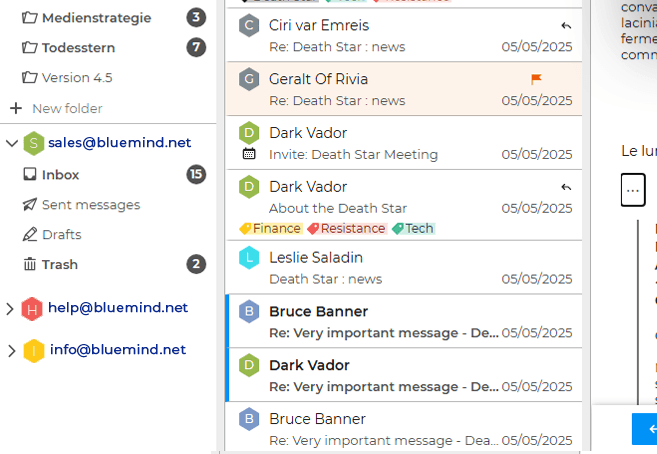
A shared mailbox is no longer just a generic email address managed by several people, such as support@company.com or cityhall@municipality.gov. It now includes the full collaborative environment users expect from a real account, including calendars, contacts, task management, categories, delegations and more.
These shared mailboxes are created and managed like actual accounts, with the same default folders and nearly identical capabilities. The difference is that access is granted through delegated permissions rather than direct authentication.
This evolution preserves the workflows Outlook users depend on every day. Teams can schedule meetings, send invitations or coordinate activities directly from a shared mailbox. Access rights are then delegated according to each user’s role and permissions.
A consistent experience across BlueMind, webmail and Outlook
Many organisations use Outlook on desktop while also relying on BlueMind webmail or mobile access. The new shared mailboxes have been designed to make this coexistence seamless. Users find the same structures and collaborative features regardless of the interface they use.
Message categories are a good example of this continuity. Categories assigned to an email in Outlook are instantly visible inside BlueMind webmail as well.
Users working within a shared mailbox can organise messages using the same visual markers across every environment, including colours, labels, importance flags and priorities. This consistency makes collaboration between Outlook users and BlueMind webmail users completely natural. Teams can move progressively from Outlook to webmail without having to relearn their daily routines.
Redesigned sharing and delegation management
BlueMind 5.5 also introduces major improvements to rules, filters and delegation management.
IT teams coming from Microsoft environments will immediately recognise the logic and administration model they are used to. Shared mailboxes now function as true collaborative workspaces where messages can be organised automatically.
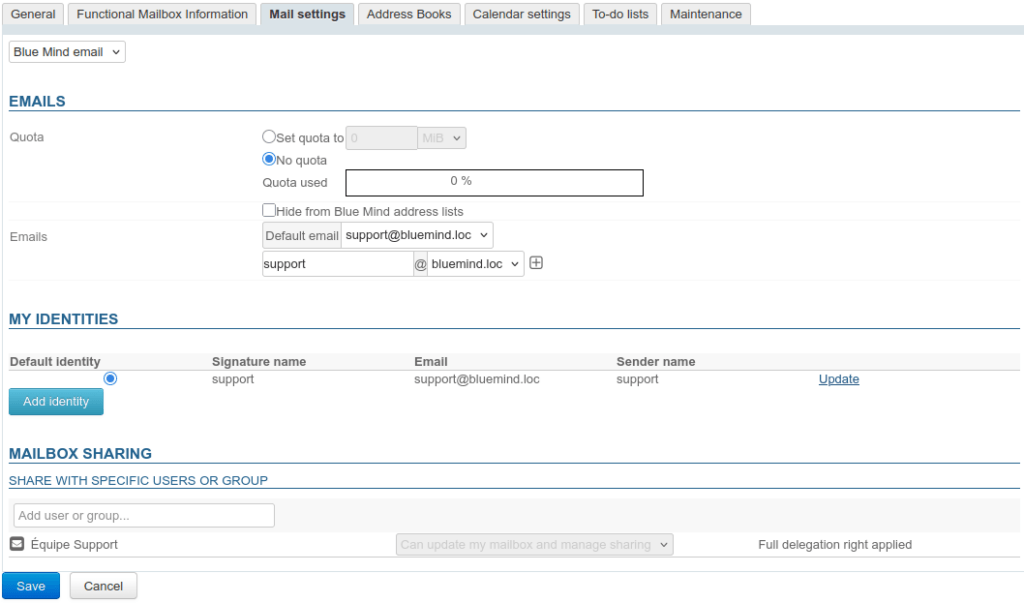
BlueMind 5.5 includes a unified interface for managing permissions and delegations. The principle is simple: permissions are configured the same way whether they apply to an individual account or to a shared mailbox. Users can continue managing certain delegations directly from their own settings, while administrators retain full control through the administration console.
Administrator view:
User view:
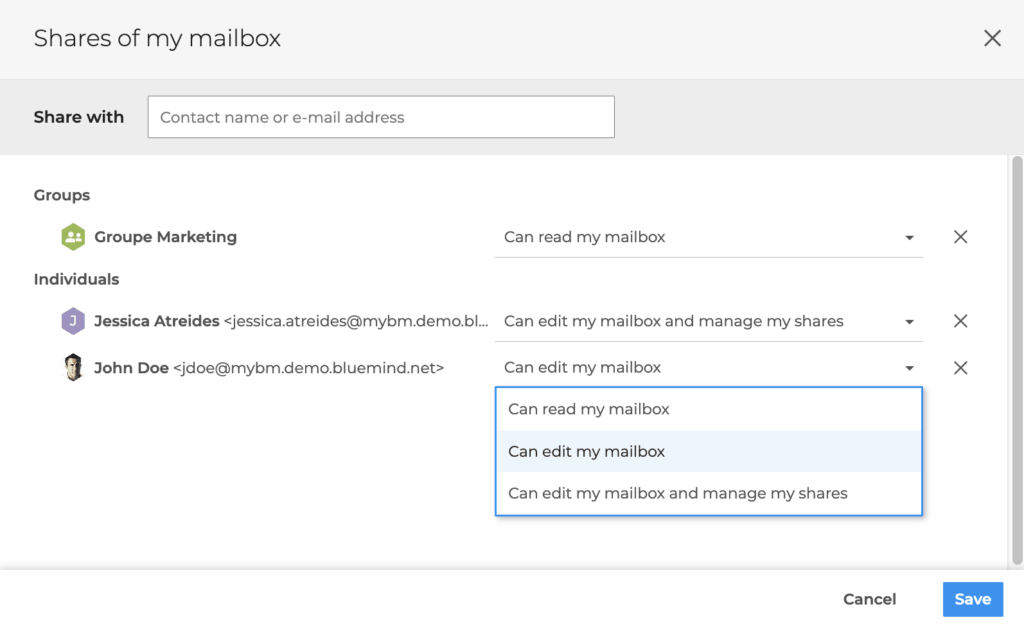
One particularly useful addition is group-based delegation. When an entire team needs access to a mailbox or calendar, administrators can simply assign permissions to a group rather than configuring each user individually. Every member of the group automatically inherits the same rights. This dramatically simplifies administration in large organisations while maintaining compatibility with Outlook workflows.
Shared mailboxes as a key building block for everyday collaboration
With BlueMind 5.5, shared mailboxes gain both functional depth and technical consistency. Users can continue relying on the collaborative habits they built around Exchange and Outlook while benefiting from an open and sovereign environment.
This evolution reflects the approach BlueMind has followed from the beginning: adapting to the way people actually work. The objective is to provide a collaborative messaging platform that integrates naturally into existing workflows while allowing organisations to regain control over their digital environment.